

Last year, a video went viral across Nigerian social media. A vendor, confident on camera, was promising buyers he could turn a 2018 iPhone XR into an iPhone 16 Pro Max. Not a software trick. Not a metaphor. He meant it literally. New casing, fake startup animation, Apple logo on the back. For somewhere between N180,000 and N250,000, depending on how much he thought you knew, you could walk out of Computer Village with what looked every bit like a flagship iPhone and was, underneath the casing, nothing of the sort.
- Why Nigeria Has Become a Dumping Ground for Cloned iPhones
- What These Fake Phones Actually Are (And What They Are Not)
- How to Verify an iPhone Using Its IMEI Number
- The Serial Number Check: Apple’s Official Verification Tool
- Physical Signs That Give a Fake iPhone Away
- Features Only a Genuine iPhone Can Do
- The NCC’s Device Management System and What It Means for Buyers
- Where to Buy an iPhone in Nigeria Without Getting Burned
- The Information Gap Is the Business Model
That video was not an isolated incident. It was a window into a market that the Nigerian Communications Commission estimates has a counterfeit problem covering as much as 40 percent of all mobile devices in circulation. Sixty-three million new phones sell in Nigeria annually, according to NCC data. The math on what that 40 percent figure actually represents is uncomfortable. People are buying phones they believe are genuine, paying prices that assume genuine, and finding out the hard way that what they got was something assembled to deceive.
The iPhone is the most cloned device in this market. Its premium status, the cultural weight it carries, the prices people will pay for it; all of that makes it the most profitable target for counterfeiters. But there are ways to know, before you hand over any money, whether the phone you are holding is real. The most reliable of those methods starts with a 15-digit number.
How to Verify an Original iPhone Using IMEI in Nigeria

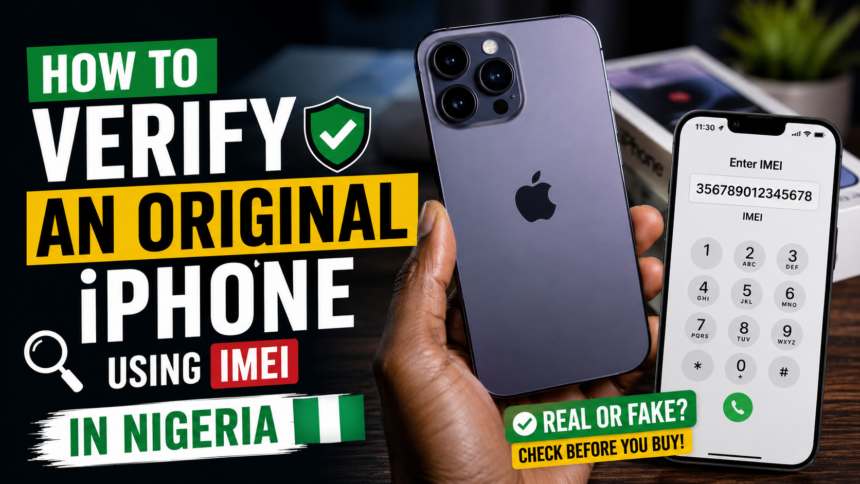
Knowing how to verify an original iPhone using IMEI is, at this point, less optional and more essential for any Nigerian buying a phone in a market where counterfeits are this well-funded and this convincing. The IMEI is the phone’s identity. It exists in Apple’s database, and it does not lie. The steps to check it take less than five minutes, and they can save you from spending real money on a device that will fail you within months.
Why Nigeria Has Become a Dumping Ground for Cloned iPhones
The economics of this trade are not complicated. A convincing clone costs a supplier in Shenzhen or Guangzhou somewhere between N40,000 and N50,000 to produce and ship. It sells in Nigerian markets for N180,000 to N250,000 or more. That margin, on a single transaction, is three to five times the cost. Scale that across a busy weekend at Computer Village and the profits speak for themselves.
Nigeria’s conditions make this business unusually easy to run. Purchasing power has been under pressure for years. When a new iPhone 16 from an authorized dealer costs over N1 million at the official exchange rate, a phone that looks identical at a fraction of the price is genuinely tempting. Sellers exploit exactly that gap. They know their buyers want the experience of owning an iPhone without the official price, and they have built an entire supply chain around that want.
The channels through which these phones enter the country are equally difficult to regulate. Imports flow through Alaba International Market, through informal cargo routes from China and Dubai, through networks of middlemen who understand the customs process well enough to move high volumes without drawing scrutiny. Some phones are genuine Apple hardware that has been physically modified, stripped down to the board and rebuilt with a newer casing to look like a more recent model. Others are Chinese-made Android devices running a custom skin designed to mimic iOS on first glance. Both end up at the same stall with the same pitch: original iPhone, best price.
The scale became visible enough that the NCC took note. Between May 2023 and April 2024, an estimated 25.35 million phones were stolen across Nigeria, making it the country’s most commonly reported crime. Only about 11.7 percent of victims ever got their devices back. Many of those stolen phones feed the same market. Picked up cheap, fitted with a new casing, given a fresh IMEI sticker, and sold again.
What These Fake Phones Actually Are (And What They Are Not)
There are two broad categories of what Nigerians encounter when buying from unofficial sources, and they behave very differently. The first category is cloned iPhones: Android devices, usually from Chinese manufacturers, that have been modified externally and with a custom software skin to resemble iOS. They boot with an Apple logo. They display an interface that looks like iOS at a glance. They carry a model name on the back that corresponds to a real iPhone. But underneath, there is no Apple hardware, no Apple software, and no Apple ID infrastructure. These devices cannot activate iMessage or FaceTime. They cannot receive legitimate iOS updates. They will redirect you to a third-party app store that looks like the App Store but is not.
The second category is tampered genuine Apple hardware. An original iPhone XR from 2018 is gutted and reassembled inside an iPhone 16 casing. The internal components are still Apple’s, which means some basic Apple features function. Siri works. iOS boots. The Apple ID infrastructure responds. But the IMEI tells a different story. The serial number on the device will not match the model being claimed. Apple’s database will show the device as an iPhone XR or iPhone 11, not what the casing says. And because older iPhone models age quickly in terms of battery health and internal wear, that phone will deteriorate far faster than a genuine iPhone 16 would.
Technology analyst Jide Awe, speaking to BusinessDay in October 2025, described the downstream damage of this trade clearly: “When consumers buy what they believe is an iPhone 17 Pro Max but end up with a 2018 iPhone XR in a new casing, it damages confidence in the entire ecosystem. People begin to associate Apple with poor quality or short battery life, not realizing they bought a counterfeit.”
There is also a third and more serious problem that neither category above captures fully. Some counterfeit devices arrive from the factory preloaded with malware. Keyloggers, banking trojans, spyware that harvests login credentials. The NCC has flagged this specifically: people have had their banking details compromised by phones they believed were legitimate purchases. You buy the phone, you install your bank app, and the phone was already waiting for that.
How to Verify an iPhone Using Its IMEI Number
The IMEI, which stands for International Mobile Equipment Identity, is a 15-digit number unique to every legitimate mobile device. No two authentic phones share the same IMEI. When you check that number against Apple’s database or a verified global IMEI registry, you get the device’s true identity: its actual model, its manufacture date, its warranty status, and whether it has ever been reported stolen or blacklisted.
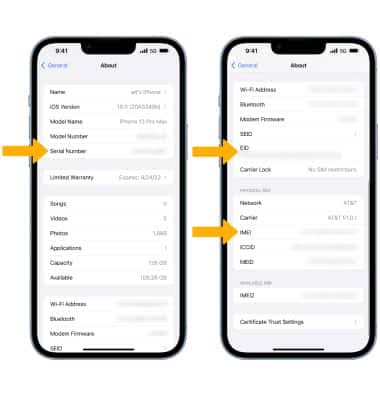
Retrieving the IMEI takes seconds. Dial *#06# from the phone’s dialer. The number should appear on screen immediately. You can also find it by going to Settings, then General, then About, and scrolling until you see the IMEI field. On an iPhone with a physical SIM tray, the IMEI is also printed on the tray itself. If you are buying a sealed box, the IMEI will be on the outer packaging.
Once you have the number, go to imei.info and enter it. The site will return the device’s registered brand, model, production specs, and whether it is listed on any international blacklist. A genuine iPhone 16 Pro will return details that correspond exactly to what the seller is claiming. If the site returns an older model, a different brand entirely, or flags the IMEI as invalid, you have your answer. Do not buy.
Cross-check this with Apple’s own verification. Go to checkcoverage.apple.com and enter the IMEI or serial number. Apple’s system will show the exact model, the original purchase date, the warranty coverage, and the support eligibility. If the page returns an error, or if the model shown does not match what you are holding, that phone is either a clone or a tampered genuine device. Either way, it is not what it is being sold as.
One thing to watch for: counterfeiters sometimes print IMEI stickers on boxes that do not match the phone inside, or that are duplicated across multiple units. Always check the IMEI from within the device’s own settings, not just from the box sticker or the SIM tray. The number needs to match across all three: the sticker, the tray, and the settings menu. If any one of those three shows a different number, walk away.
The Serial Number Check: Apple’s Official Verification Tool
The IMEI check gives you broad confirmation. The serial number check is what gives you the specific details. Every genuine iPhone has a unique serial number that is registered with Apple from the moment it leaves the factory. No clone can replicate this, because Apple’s database does not contain them.
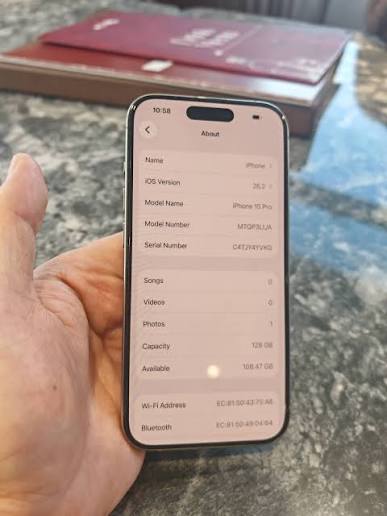
To find the serial number, go to Settings, then General, then About. Copy it precisely, including any uppercase letters. Then go to checkcoverage.apple.com and paste it into the search field. If the iPhone is genuine, Apple will return information including the exact model name, the purchase date or activation date, whether the warranty is active, and whether the device is covered under AppleCare.
If Apple’s site returns a message saying the serial number is invalid, or says the coverage cannot be confirmed, the device is either fake, unofficially refurbished, or has been tampered with in a way that breaks the chain of Apple’s records. None of those outcomes are good for a buyer. An invalid serial number on a device being sold as original is not a grey area. It means the device is not what it claims to be.
There is a specific scenario worth knowing: some sellers have obtained genuine serial numbers from legitimate Apple receipts or packaging, then programmed those numbers into fake devices. This is one reason why it is important to check the serial number against Apple’s system rather than simply verifying it exists. Apple’s system will return model-specific details. If the model it returns does not match the physical device in your hand, the serial number has been stolen.
Physical Signs That Give a Fake iPhone Away
The IMEI and serial number checks are the most reliable verification tools available. But there are also physical characteristics that separate a genuine iPhone from a clone, and learning to read them quickly can save you from a bad transaction before you even need to run a database check.
Start with the weight. Apple uses aluminum and aerospace-grade glass on its iPhone bodies. This gives genuine iPhones a specific, solid feel. Clones, especially Android-based ones, tend to use cheaper plastics or lower-grade metals. They are usually lighter, and the lightness has a hollow quality that becomes obvious once you have held an authentic iPhone. If the phone feels noticeably light for its claimed size, that is a signal.

Look at the Apple logo on the back. On a genuine iPhone, the logo is flush with the surface, precisely centered, highly reflective, and seamlessly integrated. On clones, the logo is often slightly raised, imprecisely placed, or has a finish that is duller or slightly off. This is one area where the manufacturing gap between Chinese clone factories and Apple’s supply chain becomes visible even to the naked eye.
Check the buttons. On a genuine iPhone, the power button and volume buttons have a firm, precise click. They do not wobble. They do not feel loose. The gap between the buttons and the body is even and tight. Clones almost always have some slop in the buttons, either a slight rattle, a mushier press, or uneven gaps. Run your fingertip along the edge of the buttons while pressing them. The tactile difference from the real thing is usually detectable.
Examine the display. Apple’s Super Retina XDR screens have specific brightness, color accuracy, and sharpness characteristics. The bezels on genuine iPhones are uniform and tight. Counterfeit screens tend to be cooler or warmer in color temperature than Apple’s default calibration, and on close inspection at an angle, they often show inconsistencies in how the glass meets the frame. The glass on genuine iPhones does not flex when pressed at the edges. A clone’s screen sometimes does.
Features Only a Genuine iPhone Can Do
Software verification is a layer of confirmation that complements the physical checks. Genuine iPhones run iOS, and iOS has specific behaviors and service integrations that Android-based clones cannot accurately replicate, regardless of how convincing the interface looks on first glance.
Ask to set up iMessage. Open the Messages app and go to Settings, then Messages, and toggle iMessage on. On a genuine iPhone connected to a working Apple ID, iMessage will activate within seconds, confirmed with a message from Apple that it has been enabled. On a clone running an Android-based iOS skin, this toggle either does not exist, throws an error, or takes you through a fake activation flow that never actually connects to Apple’s servers.
Try Face ID or Touch ID, depending on the model. Set it up fresh in the presence of the seller. On genuine iPhones, biometric setup is smooth, consistent, and responds at the hardware level. Clones simulate this feature in software but the behavior is usually inconsistent, and in many cases the feature simply does not function as expected when you attempt actual verification.
Open the App Store and search for a specific app, then try to download it. On a genuine iPhone, the App Store is Apple’s actual App Store. On a clone, tapping the App Store icon usually redirects to a third-party store that visually resembles it but is not connected to Apple’s infrastructure. Some clones go further and display a convincing copy of the App Store’s interface, but the apps listed either do not match current App Store listings or fail to install with Apple’s authentication.
Go to Settings, then General, then Software Update. On a genuine iPhone, this checks Apple’s update servers and returns the current iOS version with an option to update if one is available. On a clone, this either shows an error, shows a fake update interface that does not connect to Apple, or shows a version number that does not correspond to any real iOS release.
The NCC’s Device Management System and What It Means for Buyers
Nigeria’s telecoms regulator has been building a response to the counterfeit phone market for years. In October 2025, the Nigerian Communications Commission publicly disclosed the implementation of its Device Management System, a centralized IMEI registry that will track every mobile device connected to Nigerian networks and block any phone flagged as fake, stolen, cloned, or not type-approved.
The system, which has been in development for nearly a decade and is being rolled out through a Public-Private Partnership, is designed around exactly the vulnerability that counterfeit sellers exploit. When the DMS is fully operational, a phone with an invalid or duplicate IMEI will simply stop working on every Nigerian network simultaneously. It will not be able to make calls, send SMS, or access mobile data. The blacklisting will be shared across all network operators, meaning a phone disconnected on MTN cannot reconnect through Airtel or Glo.
The NCC was direct about the security dimension of this. “The system will ensure that only type-approved and legitimate devices are connected to Nigerian networks,” the Commission stated in materials cited by BusinessDay. “It is also a national security measure, as untraceable phones are often used in crimes ranging from fraud to terrorism.” The NCC has specifically noted that cloned and untraceable devices have been used by criminal networks, a problem the DMS is explicitly designed to address.
For buyers, this creates a practical timeline concern. People who currently own counterfeit devices or tampered phones may find their devices progressively disconnected from networks as the DMS rolls out. The system is being implemented gradually to minimize disruption, but the direction is clear. Phones that cannot be verified against the IMEI database will be rendered unusable. Buying a fake iPhone now is not just a matter of getting poor value for money. It is buying a device that has a likely expiration date on its ability to function as a phone.
The Association of Mobile Communication Device Technicians of Nigeria has been advising buyers to register IMEIs at the point of sale and retain receipts. This creates a paper trail that can support ownership claims if a device is ever questioned. It is reasonable advice regardless of the DMS timeline.
Where to Buy an iPhone in Nigeria Without Getting Burned
The two Apple-authorized resellers in Nigeria are iStore and iConnect, both operating under Redington, which holds the sole value-added distributor license for Apple in the country. iStore has locations in Ikeja City Mall and Jabi Lake Mall in Abuja. iConnect operates its flagship store in Palms Shopping Mall, Lekki. Devices purchased from these outlets come with a 24-month warranty, six months of screen and liquid damage protection, and direct access to after-sales support. The Redington sticker on the box is the visible marker of an authorized unit, one that has cleared customs through official channels with duties paid.
The prices at authorized resellers are higher than what you will find in Computer Village or from a WhatsApp vendor, and there is no pretending otherwise. An iPhone purchased through official channels reflects the real exchange rate, import duties, and distribution margins. But that price includes the certainty that what you are buying is exactly what it says it is. The IMEI will verify. The serial number will verify. The warranty will be honored. When something goes wrong, there is somewhere to go.
Buying from Computer Village is not automatically wrong. There are legitimate sellers operating there who deal in genuine used or refurbished iPhones. The difference is verification. Before any payment, run the IMEI on imei.info and the serial number on checkcoverage.apple.com. Test iMessage, Face ID, and the App Store while you are still standing in the seller’s space. If a seller will not allow you five to ten minutes to run these checks, that is your answer. Any legitimate seller of a genuine iPhone has no reason to rush you.
Jumia and other formal online platforms offer some additional consumer protection relative to anonymous social media vendors, but they are not immune to counterfeit listings. The same IMEI and serial number checks apply regardless of platform. Request the IMEI before purchase, verify it against Apple’s database, and only complete the transaction when the numbers check out.
The Information Gap Is the Business Model
The fake iPhone market runs on one thing: people not knowing how to verify what they are buying. The checks that distinguish a genuine iPhone from a convincing clone are not technical. They do not require tools or training. They take less time than the sales pitch the seller uses to convince you the phone is real. But most buyers do not know these checks exist, or they are uncomfortable performing them in front of a seller, or they want to believe the price they are being offered is legitimate and allow that want to override their judgment.
Understanding how to verify an original iPhone using IMEI is ultimately about not being available for a specific kind of exploitation. The people selling these phones are not making a mistake. They know the phone is fake. They are banking on the buyer not knowing how to confirm it. The five-minute check that prevents a N200,000 loss is not a technical barrier. It is an information one.
The NCC’s Device Management System will eventually change the structural conditions of this market. Phones with invalid or duplicate IMEIs will lose network access, and the economic logic of selling them will shift. But that system is rolling out gradually, and in the meantime, the market is exactly as it has been. Buyers in Nigeria need to protect themselves now, with the verification tools that already exist, before the regulatory infrastructure catches up to the problem.