


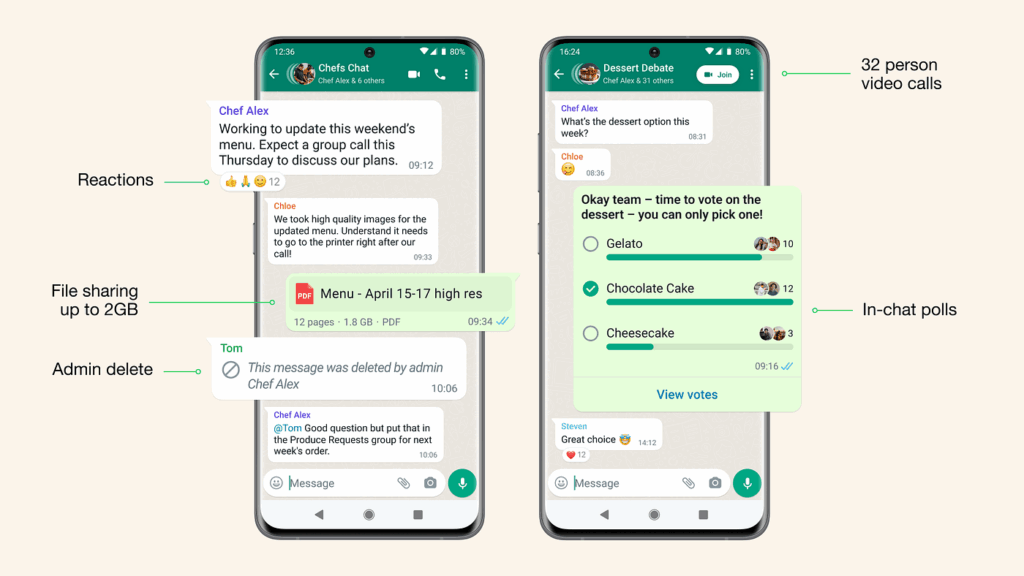
Are you looking to stay connected with friends, family, or colleagues? Creating a WhatsApp group is an excellent way to streamline communication and share information efficiently. Whether you’re planning an event, coordinating a project, or simply want to keep in touch with loved ones, WhatsApp groups offer a convenient platform for group messaging.
In this article, you’ll learn the step-by-step process of creating a WhatsApp group, along with tips for managing and customizing your group to suit your needs. By the end, you’ll be equipped with the knowledge to create and maintain a thriving WhatsApp community.
What is a WhatsApp Group?
A WhatsApp group is a powerful feature that allows multiple users to communicate simultaneously within a single chat interface. When you create a WhatsApp group, you’re essentially setting up a virtual meeting room where participants can share messages, media, and engage in real-time conversations.
WhatsApp groups serve various purposes, from casual social interactions to professional collaborations. When you create a WhatsApp group, you become the group admin, giving you control over settings and member management.


WhatsApp groups can accommodate up to 1024 participants, making them suitable for both small gatherings and larger communities. Some key features include:
- Group description: A brief overview of the group’s purpose
- Group icon: A customizable image representing the group
- Mute notifications: Ability to silence group messages for set periods
- Group invite links: Easy way to add new members
It’s important to note that when you create a WhatsApp group, all members can see each other’s phone numbers. However, WhatsApp employs end-to-end encryption, ensuring that only group participants can read the messages exchanged.
Understanding these basics will help you make the most of WhatsApp groups, whether you’re looking to stay connected with loved ones or collaborate with teammates. Now that you know what a WhatsApp group is, let’s explore how to create one.
Benefits of Creating a WhatsApp Group
Creating a WhatsApp group can be a game-changer for your communication needs. Let’s explore some compelling reasons why you should consider how to create a WhatsApp group:
Effortless Mass Communication
With a WhatsApp group, you can instantly reach multiple people with a single message. This feature is invaluable for coordinating events, sharing important updates, or simply staying in touch with friends and family.
Cost-Effective Collaboration
WhatsApp groups are free to create and use, making them an economical choice for team collaboration. You can share files, images, and videos without incurring additional costs.
Real-Time Information Sharing
Groups enable quick dissemination of time-sensitive information. Whether it’s breaking news or last-minute changes to plans, everyone stays in the loop simultaneously.
Enhanced Community Building
WhatsApp groups foster a sense of belonging among members. They’re great for creating virtual communities around shared interests or goals.
Streamlined Decision Making
Need to make a quick decision? Polls and group discussions in WhatsApp groups facilitate faster consensus-building among team members or friends.
Centralized Information Hub
Groups serve as a repository for shared information. Important details, documents, and discussions are all in one place, easily accessible to all members.
Increased Engagement and Participation
The informal nature of WhatsApp groups often encourages more open communication and participation compared to formal channels.
Flexible Admin Controls
Group creators have various admin tools at their disposal, allowing them to manage member access, set group rules, and moderate discussions effectively.
How to Create a WhatsApp Group


Creating a WhatsApp group is a breeze once you know the ropes. Let’s walk through how to create a WhatsApp group step by step.
Open WhatsApp and Navigate to Groups
First things first, fire up your WhatsApp app. Look for the “Chats” tab at the bottom of your screen. In the top right corner, you’ll spot a “New chat” icon, usually it’s a speech bubble or a pencil. Tap that, then select “New group” from the menu that pops up.
Select Your Group Members
Now comes the fun part, choosing who to invite! Scroll through your contacts and tap on the names you want to add. Don’t worry if you forget someone; you can always add more people later. Once you’re happy with your selection, hit the green arrow or “Next” button.
Set Up Your Group Details
Time to give your group some personality! Choose a catchy name that reflects the group’s purpose. Then, tap on the camera icon to set a group picture. You can snap a new photo or pick one from your gallery. This step is optional, but it helps your group stand out.
Finalize and Start Chatting
You’re almost there! After setting up the details, tap “Create” or “Done”. Voila! You’ve just learned how to create a WhatsApp group. Your new group chat will appear, ready for you to send your first message. Remember, as the creator, you’re automatically an admin, giving you special privileges to manage the group.
Customizing Your WhatsApp Group Settings
Once you’ve learned how to create a WhatsApp group, it’s time to personalize it. Customizing your group settings not only makes it more engaging but also helps manage communication effectively.
Set a Group Description
Start by adding a brief description that outlines the group’s purpose. This helps new members understand what the group is about and sets expectations for interactions.
Choose the Perfect Group Icon
Select an eye-catching image that represents your group’s theme. This could be a logo, a relevant photo, or even a custom-designed graphic. A unique icon helps your group stand out in members’ chat lists.
Manage Member Permissions
WhatsApp offers various options to control who can send messages or edit group info. You can restrict these permissions to admins only or allow all members to participate. This feature is particularly useful for announcement groups or large communities.
Enable Disappearing Messages
For groups that discuss sensitive topics, consider turning on disappearing messages. This feature automatically deletes messages after a set period, enhancing privacy and keeping the chat clutter-free.
Remember, the key to a successful WhatsApp group lies in its management. By customizing these settings, you’ll create a more organized and engaging space for your members. Don’t be afraid to experiment with different options to find what works best for your group’s needs.
Adding Members to Your WhatsApp Group
Now that you’ve created your WhatsApp group, it’s time to populate it with members. Adding people to your group is a crucial step in how to create a WhatsApp group that thrives. Here’s how to do it:
Invite via Link
The easiest way to add members is by sharing an invite link. To generate this:
- Open your group chat
- Tap the group name at the top
- Select “Invite to Group via Link”
- Choose how you want to share the link
This method is great for larger groups or when you want members to join at their convenience.
Add Contacts Manually
For a more personalized touch:
- Open your group chat
- Tap the group name
- Select “Add Participants”
- Choose contacts from your list
This works well for smaller, more intimate groups where you know everyone personally.
Tips for Growing Your Group
- Be selective: Quality over quantity ensures engaging discussions.
- Set expectations: Let new members know the group’s purpose upfront.
- Encourage participation: Welcome newbies and prompt conversations to keep the group active.
Remember, a successful WhatsApp group isn’t just about numbers, it’s about creating a space where members feel comfortable and engaged. By following these steps on how to create a WhatsApp group and add members thoughtfully, you’ll be on your way to fostering a vibrant online community.
Promoting Your WhatsApp Group
Promoting your group effectively can help attract the right members and keep your community thriving. Here are some strategies to boost your group’s visibility:
Leverage Social Media
Share your group’s link on other social platforms like Facebook, X, or Instagram. Create eye-catching graphics or short videos explaining what your group is about and why people should join. Remember to use relevant hashtags to increase discoverability.
Collaborate with Influencers
Reach out to influencers or thought leaders in your niche. Ask them to mention your group or even join as special guests. Their endorsement can bring a flood of new members who are genuinely interested in your group’s topic.
Optimize Your Group Description
Craft a compelling group description that clearly outlines the purpose and benefits of joining. Use keywords related to your group’s theme to help it appear in WhatsApp’s search results. A well-written description can be the deciding factor for potential members.
Host Exclusive Events
Organize virtual events or Q&A sessions exclusively for group members. Promote these events outside the group to create FOMO (fear of missing out) and encourage more people to join. This strategy not only attracts new members but also keeps existing ones engaged.
Engaging Your WhatsApp Group Members
Creating a WhatsApp group is just the first step. To keep your group active and thriving, you’ll need to engage your members effectively. Here are some tips on how to create a WhatsApp group that keeps everyone interested and participating:
Set Clear Expectations
When you create a WhatsApp group, establish guidelines from the start. Clearly communicate the group’s purpose, rules, and what kind of content is welcome. This helps members understand how to contribute meaningfully.
Encourage Participation
Don’t let your group become a one-way street. Ask questions, create polls, or start discussions to get members talking. Remember, the key to how to create a WhatsApp group that’s successful is fostering interaction.
Share Valuable Content
Regularly post interesting and relevant information. This could be news articles, helpful tips, or fun facts related to your group’s theme. Quality content gives members a reason to check in regularly.
Use Multimedia
Spice things up with images, videos, and voice messages. Visual content can grab attention and spark conversations more effectively than text alone.
Be Responsive
As the group admin, set the tone by responding promptly to messages and questions. This encourages others to do the same, creating a more dynamic and engaging environment.
By following these strategies, you’ll be well on your way to creating a vibrant WhatsApp group that members look forward to participating in.
Moderating and Managing Your WhatsApp Group
Once you’ve learned how to create a WhatsApp group, it’s crucial to effectively moderate and manage it. This ensures a positive experience for all members and helps achieve the group’s purpose.
Setting Clear Guidelines
Start by establishing and communicating clear rules. This might include guidelines on appropriate content, posting frequency, and respectful communication. Pin these rules to the top of the chat for easy reference.
Appointing Admins
As your group grows, consider appointing trusted members as additional admins. They can help enforce rules, remove problematic members, and keep discussions on track. To do this, tap on the group info, select a member, and choose “Make group admin.”
Managing Member Interactions
Regularly monitor group interactions and address any issues promptly. Use the mute feature for members who consistently violate rules. In extreme cases, don’t hesitate to remove and block disruptive individuals.
Encouraging Engagement
Keep the group active by initiating discussions, sharing relevant content, and acknowledging valuable contributions. Consider creating themed days or weekly prompts to spark conversation.
By implementing these strategies, you’ll create a thriving community that members enjoy being part of. Remember, successful moderation is an ongoing process that requires patience and consistency.
Frequently Asked Questions
These are some frequently asked questions and answers about how to create a WhatsApp group.
Can I add people to an existing WhatsApp group?
Yes, you can add members to an existing group. Open the group chat, tap the group name at the top, then select “Add Participants.” Choose the contacts you want to add and tap “Done.”
How can I leave or delete a WhatsApp group?
To leave a group, open the group chat, tap the group name, scroll down, and select “Exit Group.” If you’re the group admin and want to delete the group entirely, you’ll need to remove all participants first, then exit the group yourself.
What’s the difference between a group admin and regular members?
Group admins have additional privileges, such as adding or removing participants, changing the group name or description, and appointing other admins. Regular members can only send messages and view group information.
Can I create a WhatsApp group without adding members immediately?
Yes, you can create a WhatsApp group without adding members right away. Simply follow the steps to create a group, but don’t select any contacts when prompted. You can add members later as needed.
Conclusion
Creating a WhatsApp group is a simple yet powerful way to enhance your communication and collaboration. By following the steps outlined in this guide, you can easily set up a group that meets your specific needs. Remember to choose an appropriate name, add relevant members, and customize settings to ensure a smooth experience for all participants.
As you manage your group, stay mindful of best practices for engagement and moderation. With WhatsApp groups, you have a versatile tool at your fingertips to connect with friends, family, colleagues, or communities. Start creating your group today and unlock new possibilities for staying connected in our increasingly digital world.