
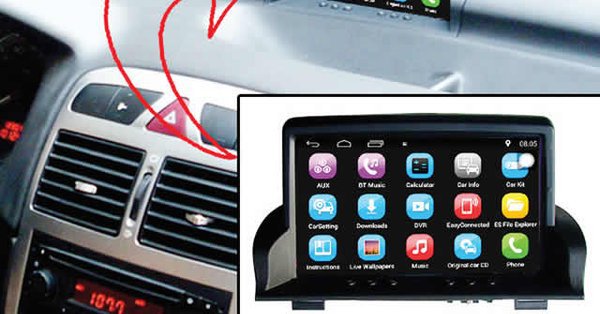
Bluetooth and Wi-Fi are similar technologies at a basic conceptual level, but they have very different real world applications in your car or truck. The main way to use Bluetooth in your vehicle is to connect your phone to the stereo, while Wi-Fi is typically used to share an Internet connection from your phone or hotspot to other devices like your head unit or a tablet.
According to Lifewire, there is a certain amount of overlap, which can lead to some confusion about the difference between Bluetooth and Wi-Fi, but the technologies are actually pretty different when you take a closer look.
The basics of Bluetooth
Bluetooth is a wireless networking protocol that was originally developed to take the place of clunky old network cables. It works by allowing two devices to connect to each other wirelessly via radio frequency transmissions. In fact, it operates in the same 2.4 GHz band used by many non-Bluetooth wireless peripherals like mice and keyboards, some cordless phones, and even some Wi-Fi networks.
The range of a Bluetooth connection is typically given as about 30 feet, but the distance is shorter in most practical situations. Due to this relatively short range, its low power nature and other factors, a Bluetooth connection is said to create a personal area network. This can be contrasted with the type of local area network that you can create via Wi-Fi.
Wi-Fi is not the Internet
One of the biggest misconceptions about Wi-Fi is that it has anything to do with the Internet. It’s an easy mistake to make, since the wide proliferation of Wi-Fi means that most people connect to the Internet by connecting to a Wi-Fi network. However, all the Wi-Fi network does is connect one or more computers or devices to a central router and to each other. If that router is connected to the Internet, then the other devices on the network can also access the Internet.
While Bluetooth is primarily used to connect two devices to each other in a personal area network, Wi-Fi is most commonly used to connect one or more devices to a router. The router allows the devices to share information back and forth just like a wired Local Area Network. Many routers today are built into modems, but they are actually separate devices. In fact, it is possible to use a wireless router to create a Wi-Fi network without any Internet connection involved. In that type of situation, the individual devices can share data with each other, but they can’t access the Internet.
There are situations where one or more devices can be connected via Wi-Fi without a router, but they are more complicated to set up. This type of connection is called an ad hoc network, and it essentially allows a Wi-Fi enabled device to connect to one or more other devices without a router. If the device, whether it is a phone, laptop, or otherwise, has an Internet connection, then it is sometimes possible to share that connection.
Wi-Fi operates via radio frequency just like Bluetooth, but the range of a Wi-Fi network will typically be much wider than the range of a Bluetooth connection. Although many Wi-Fi networks use the same 2.4 GHz band as Bluetooth, Wi-Fi uses a lot more power. In fact, some tests have shown that Bluetooth only uses about three per cent of the power as Wi-Fi to accomplish similar tasks.
The difference between Bluetooth and Wi-Fi
Aside from range and power consumption, Wi-Fi and Bluetooth also differ in terms of data transfer speed. Bluetooth is typically much slower, and offers less bandwidth, than Wi-Fi. This is one of the reasons that Bluetooth audio quality isn’t that great, while Wi-Fi can be used to stream high quality music, video content, and other data.
For instance, Bluetooth 4.0 offers greater speed than previous versions of the technology. However, Bluetooth 4.0 is still capped at 25Mbps. Wi-Fi network speeds differ depending on the specific protocol, but even the relatively slow Wi-Fi Direct, which is a Bluetooth competitor, can provide speed up to 250 Mbps.
Although Bluetooth and Wi-Fi are both used to create relatively short-range wireless networks, there are also big differences in how each technology is most commonly used. Since Bluetooth is primarily designed to connect two devices to each other in a short range, low power, personal area network, it is perfectly suited to a number of usage scenarios in a car or truck.
The primary way to use Bluetooth in your vehicle is to help facilitate hands-free calling. This can take the form of connecting a Bluetooth earpiece to your phone, or it can involve pairing your phone to a compatible head unit or infotainment system. In certain cases, pairing your phone to your head unit will allow you to make and receive calls via your sound system, automatically muting your radio, without having to touch your phone or the stereo volume controls.
Bluetooth also provides an extremely easy way to listen to your digital music collection, or stream music from a service like Pandora or Spotify, from your phone. This involves pairing the phone to a Bluetooth-compatible head unit, and it essentially acts as a wireless auxiliary cable. In some cases, you may even be able to control playback via your head unit without touching your phone.
Wi-Fi typically isn’t used for those types of scenarios, but that doesn’t mean it isn’t useful in your vehicle. The main way that you can take advantage of this technology in your car is to create a wireless network to share an Internet connection or connect multiple devices to each other. If your phone is capable of tethering, or you have a dedicated wireless hotspot, you can use this type of network to provide an Internet connection to a compatible head unit, tablets, portable game consoles, and more.
Will Wi-Fi replace bluetooth in cars?
The fact is that Wi-Fi is superior to Bluetooth in a lot of ways, including both range and speed, and Wi-Fi Direct essentially erases Bluetooth’s primary benefit of convenience. However, none of that really matters in the short term. The fact is that Bluetooth is already a feature in a lot of OEM and aftermarket head units, and it is also included in virtually every modern smartphone.
Although smartphone technology tends to move and adapt pretty quickly, automotive technology is usually pretty far behind the curve. So even if Wi-Fi Direct did totally replace Bluetooth in other applications, it will probably take a while for that to be reflected in the dash of your new car.
The other issue with Wi-Fi and Wi-Fi Direct is power consumption, which will always be an issue for mobile devices. This isn’t as big a deal in automotive applications, where at least some level of extra power is available in most vehicles, but it is a huge deal for phones, MP3 players, and other mobile devices. Bluetooth is most commonly used in cars to make hands-free calls and stream music, both of which involve a phone, Bluetooth probably isn’t going anywhere any time soon.